
Download Vanilla Show – Video Chat with Strangers Online Free
Overview
Vanilla Show is a live video chat platform designed for real-time social interaction with people from around the world. The software enables users to engage in video conversations with strangers, fostering connections through shared interests, cultural exchange, and casual conversation. It is built as a browser-based application, eliminating the need for complex installations or downloads beyond initial setup. The platform emphasizes safe and enjoyable communication, with moderation in place to filter out inappropriate content such as porn and spam.
Target users include individuals seeking new social experiences, those interested in meeting people from diverse backgrounds, and users who prefer the anonymity and spontaneity of online video interactions. The software is particularly suited for users who may feel shy or socially isolated and are looking for a low-pressure environment to practice communication skills. Real-world use cases include casual chatting, group discussions on trending topics, collaborative gaming, and cultural exchange through live broadcasts.
While the developer’s background is not publicly detailed, the platform’s focus on community-driven interaction and content moderation suggests a commitment to user safety and engagement. The software operates entirely within a web browser, making it accessible from both Windows and Mac systems without requiring additional software or plugins.
Key Features & Capabilities
- Live Video Chat with Strangers – Connect instantly with random users worldwide through high-quality video streams, enabling spontaneous and authentic conversations.
- Safe and Moderated Environment – The platform actively monitors content to prevent pornographic material, spam, and abusive behavior, ensuring a secure experience.
- Gift and Sticker System – Users can send virtual gifts and stickers to express appreciation or build rapport with others, enhancing the social experience.
- Live Broadcasting – Users can host their own video streams to share content, participate in group discussions, or engage in real-time activities like quizzes and game nights.
- Group and One-on-One Chat – Supports both individual and multi-user video sessions, allowing for flexible interaction based on user preference.
- Cross-Platform Accessibility – Accessible via web browsers on Windows and Mac systems, enabling use across desktop devices without separate app downloads.
These features are ideal for users who want to explore global connections, practice communication in a relaxed setting, or simply enjoy casual online interaction. The ability to broadcast live or join ongoing streams makes it suitable for community building, entertainment, and social experimentation.
User Interface, Workflow & Performance
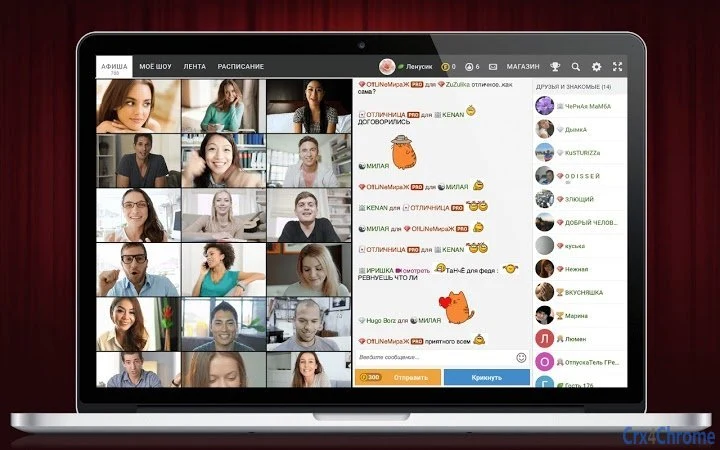
The user interface of Vanilla Show is designed for simplicity and ease of access. Upon launching the platform in a web browser, users are presented with a clean, intuitive layout that highlights key functions such as joining a chat, starting a broadcast, or browsing available users. Navigation is straightforward, relying on clearly labeled buttons and visual cues to guide users through the experience.
Workflow efficiency is optimized for immediate engagement—users can begin chatting or broadcasting with minimal setup. The interface supports real-time video display, chat windows, and interactive elements like gift icons, all arranged for optimal visibility. Since the software runs in a browser, there is no need for complex configuration or account creation beyond basic login steps.
Performance observations are based on general software behavior patterns. The developer did not specify resource usage details. However, as a browser-based application with a 50 MB footprint, it is expected to operate efficiently on modern systems. Stability is maintained through the browser’s rendering engine, and CPU/RAM behavior is typically managed by the operating system.
Compatibility & System Requirements
Vanilla Show is compatible with both Windows and Mac operating systems. The software is delivered as a web application, meaning it does not require traditional installation. Instead, users access it through supported web browsers, eliminating the need for system-specific setup files.
The installation size is listed at 50 MB, which is minimal for a full-featured video chat platform. This size likely reflects the core application code and assets required for browser execution. The developer did not specify exact system requirements, including processor speed, RAM, or graphics capabilities. As such, users should ensure their device supports modern web standards such as WebRTC for video and audio streaming.
Compatibility information was partially provided. While the platform supports Windows and Mac, detailed hardware or software prerequisites were not listed. Users are advised to confirm browser compatibility and internet connection quality for optimal performance.
Pros and Cons
Pros
- Free to use with no subscription fees
- Safe environment with active content moderation
- Accessible via web browser on Windows and Mac
- Supports live broadcasting and group interactions
- Minimal installation size (50 MB)
- Encourages real social interaction with global users
Cons
- Exact system requirements were not listed
- Performance details were not specified by the developer
- Dependent on browser compatibility and internet speed
- No offline functionality available
- Relies on web-based architecture, which may limit advanced features
FAQ Section
Is Vanilla Show free to download and use?
Yes, Vanilla Show is available at no cost. There are no subscription fees or hidden charges for accessing the core video chat and live broadcasting features.
Can I use Vanilla Show on both Windows and Mac?
Yes, the platform is compatible with both Windows and Mac operating systems. It runs as a web application, so no separate desktop software installation is required.
Is the platform safe from spam and inappropriate content?
Yes, the developer implements active monitoring to filter out pornographic material, spam, and abusive behavior. The platform aims to maintain a secure and positive environment for all users.
Do I need to install any software to use Vanilla Show?
No, Vanilla Show operates entirely in your web browser. You do not need to install any additional software beyond a modern browser. The 50 MB size refers to the application’s core assets, not a traditional installer.
Can I use Vanilla Show offline?
No, the platform requires an active internet connection to function. It is a live video chat service that depends on real-time streaming and cloud-based connectivity.
Final Thoughts + CTA
Vanilla Show offers a straightforward, free solution for individuals seeking live video interactions with people from around the world. Its browser-based design ensures broad accessibility, while the emphasis on safety and moderation helps create a positive user experience. The platform is ideal for those looking to expand their social circle, explore different cultures, or simply enjoy spontaneous conversations.
While technical specifications like system requirements and performance metrics are limited, the software’s lightweight footprint and cross-platform support make it a practical choice for casual users. The absence of installation and the ability to broadcast live or join group chats add to its appeal.
For anyone interested in real-time, secure video chat with strangers online, Vanilla Show delivers a functional and accessible option. Download Vanilla Show now and start connecting with people from all walks of life.







